YC
AWS CLOUD & DEVOPS LAB · HANDS-ON LEARNING PROJECT

Expense Tracker: Multi-Tier AWS Infrastructure & Deployment Lab

A personal cloud and DevOps engineering lab exploring how to provision, configure, and deploy a multi-tier web application on AWS. Combines declarative Terraform provisioning in ap-south-1, zero-SSH server management via Ansible over AWS Systems Manager (SSM), and automated container delivery with GitHub Actions and Amazon ECR.

PROJECT TYPEHands-On Cloud LabNot Production Scale
REGION & VPCap-south-1 · 10.0.0.0/166 Subnets (Dual-AZ)
DEPLOYMENT SECURITYAWS SSM (Zero Port 22)OIDC + IAM Profiles
DATABASE TIERRDS PostgreSQL 17Single-AZ db.t3.micro
01. PROJECT OVERVIEW

Moving Beyond Single-Host Docker Compose

In local development and entry-level setups, deploying a multi-service web application often starts and ends with a single docker-compose.yml file running on a single virtual machine. While effective for prototyping, single-host hosting obscures real-world cloud infrastructure concerns: network boundaries, least-privilege security groups, zero-trust deployment pipelines, and isolated database subnets.

I built the Expense Tracker lab as a hands-on learning environment to bridge that gap. The goal was to build the infrastructure surrounding an application from scratch on AWS:

  • Physical Network Segmentation: Provisioning a custom VPC with dedicated public, private application, and isolated database subnets across two availability zones (ap-south-1a and ap-south-1b).
  • Zero-SSH Administration: Completely closing inbound port 22 to the world, managing compute instances solely through the AWS Systems Manager (SSM) agent.
  • Declarative Infrastructure as Code: Codifying every VPC route table, NAT Gateway, security group, and IAM policy in Terraform.
  • Automated CI/CD Delivery: Automating Docker container builds with GitHub Actions, pushing images to Amazon ECR, and triggering remote deployments via SSM run commands.
  • Configuration Management: Using Ansible with dynamic EC2 inventory plugins to configure Docker runtimes on Amazon Linux 2023 instances over SSM.
02. ARCHITECTURE & NETWORK BOUNDARIES

AWS Network Topology & Traffic Boundaries

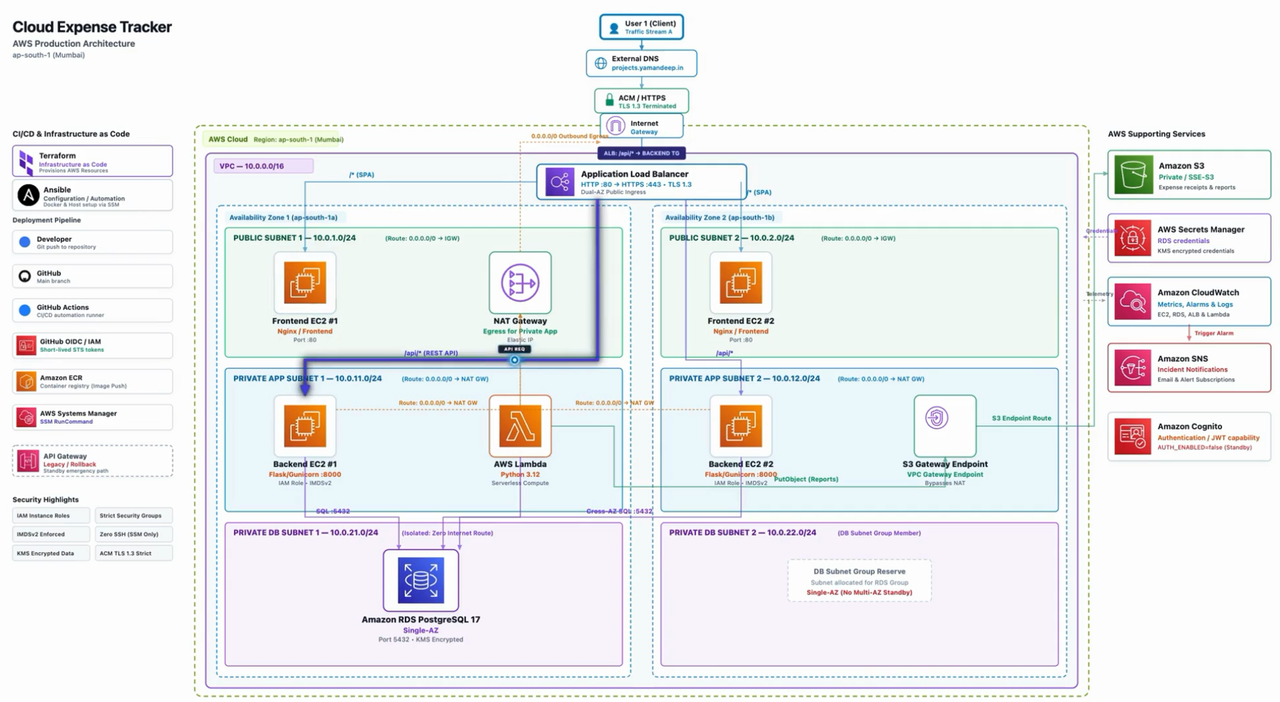
The architecture enforces strict network isolation across three distinct tiers in the ap-south-1 region. Each tier is partitioned across availability zones ap-south-1a and ap-south-1b:

AWS network topology and multi-tier architecture diagram

Network Topology: Public subnets with NAT Gateway & Frontend EC2, Private app subnets with Backend EC2 & S3 Gateway Endpoint, and isolated Database subnets hosting Single-AZ RDS PostgreSQL 17.

TIER / RESOURCESUBNET & CIDRRUNTIME & IMPLEMENTATIONROUTING & INGRESS RULES
VPC Network10.0.0.0/16Custom VPC (expense-tracker-vpc)Dual-AZ (ap-south-1a & ap-south-1b), DNS hostnames enabled
Public Edge / Ingress10.0.1.0/24 & 10.0.2.0/24Internet Gateway + NAT Gateway (Elastic IP)Direct default route 0.0.0.0/0 to IGW; hosts NAT Gateway in ap-south-1a
Frontend TierPublic Subnets (/24)2x EC2 (t3.micro, Amazon Linux 2023), Dockerized NginxAccepts HTTP on port 80; proxies /api requests internally to backend instances
Backend API Tier10.0.11.0/24 & 10.0.12.0/242x EC2 (t3.micro, Amazon Linux 2023), Flask + GunicornOutbound internet via NAT Gateway; ingress strictly restricted to port 8000 from frontend security group
Database Tier10.0.21.0/24 & 10.0.22.0/24RDS PostgreSQL 17 (db.t3.micro, gp3, 20GB)Zero route to internet; ingress strictly on port 5432 from backend security group; Single-AZ
S3 Gateway EndpointPrivate Route TableGateway VPC Endpoint (com.amazonaws.ap-south-1.s3)Direct internal AWS network routing to S3, bypassing NAT data transfer charges

Traffic Path: Client browsers access public frontend EC2 instances hosting Nginx. Nginx serves the client UI and reverse-proxies REST calls to backend EC2 instances residing in the private application subnets. The Flask backend processes transactions and communicates with Amazon RDS PostgreSQL over internal port 5432. All outbound traffic from the private subnets (such as pulling ECR images or updating system packages) routes through the NAT Gateway.

03. INFRASTRUCTURE AS CODE

Declarative Provisioning with Terraform

All AWS cloud resources were codified in modular Terraform files under terraform/. By managing infrastructure as code, the network routing tables, security group rules, EC2 compute instances, and RDS database can be planned, verified, and torn down systematically without manual console configuration.

KEY TERRAFORM ARCHITECTURAL HIGHLIGHTS
  • Subnet & Route Table Segregation: Dedicated route tables for public subnets (routing 0.0.0.0/0 to IGW), private application subnets (routing 0.0.0.0/0 to the NAT Gateway), and private database subnets (isolated with no default gateway).
  • Compute Provisioning Without SSH Keys: Instances are configured with Amazon Linux 2023 AMI retrieved dynamically via SSM Parameter Store (/aws/service/ami-amazon-linux-latest/al2023-ami-kernel-default-x86_64). No key pair is associated; administrative access relies strictly on IAM instance profiles.
  • Secrets Manager Database Credentials: RDS PostgreSQL is configured with manage_master_user_password = true, offloading master password generation and rotation to AWS Secrets Manager.
Verified Terraform Excerpt (terraform/rds.tf)
resource "aws_db_subnet_group" "expense_db_subnet_group" {
  name       = "expense-db-subnet-group"
  subnet_ids = [aws_subnet.private_db_1.id, aws_subnet.private_db_2.id]
}

resource "aws_db_instance" "expense_db_instance" {
  identifier                  = "expense-tracker-db"
  db_name                     = "expense_db"
  username                    = var.db_username
  manage_master_user_password = true
  engine                      = "postgres"
  engine_version              = "17"
  instance_class              = "db.t3.micro"
  allocated_storage           = 20
  storage_type                = "gp3"
  db_subnet_group_name        = aws_db_subnet_group.expense_db_subnet_group.name
  vpc_security_group_ids      = [aws_security_group.db_sg.id]
  publicly_accessible         = false
  storage_encrypted           = true
  deletion_protection         = true
}
04. CONTAINERIZATION & DELIVERY

Docker, Amazon ECR & Zero-SSH Delivery via AWS SSM

The frontend and backend services are decoupled into separate container images. The deployment pipeline is engineered to eliminate static cloud credentials and open management ports:

01 · MULTI-TIER CONTAINERIZATION

Frontend is packaged from nginx:alpine with an entrypoint script querying EC2 IMDSv2 metadata for dynamic host identification. Backend is built from python:3.12-slim running Gunicorn as a non-privileged system user (appuser).

02 · OIDC CREDENTIAL EXCHANGE

GitHub Actions assumes an AWS IAM role via OpenID Connect (OIDC) federation (aws-actions/configure-aws-credentials@v4). No static AWS access keys or passwords are stored in GitHub Secrets.

03 · AMAZON ECR REGISTRY

Images are built using Docker Buildx and pushed to private Amazon ECR repositories (expense-tracker-frontend, expense-tracker-backend) tagged with commit hashes and latest.

04 · AWS SSM RUN COMMAND ROLLOUT

Instead of opening SSH port 22, the pipeline dispatches shell commands via aws ssm send-command targeting instances tagged Role=backend and Role=frontend to authenticate to ECR, pull images, and restart containers.

Verified GitHub Actions SSM Dispatch Excerpt (.github/workflows/docker-build-push.yml)
- name: Configure AWS Credentials (OIDC)
  uses: aws-actions/configure-aws-credentials@v4
  with:
    role-to-assume: ${{ env.ROLE_TO_ASSUME }}
    aws-region: ${{ env.AWS_REGION }}

- name: Deploy Backend Containers via AWS SSM
  run: |
    COMMAND_ID=$(aws ssm send-command \
      --region ${{ env.AWS_REGION }} \
      --targets "Key=tag:Role,Values=backend" \
      --document-name "AWS-RunShellScript" \
      --parameters '{"commands": [
        "aws ecr get-login-password --region ${{ env.AWS_REGION }} | docker login --username AWS --password-stdin ${{ env.ECR_REGISTRY }}",
        "docker pull $BACKEND_IMAGE",
        "docker stop expense-backend || true",
        "docker rm expense-backend || true",
        "docker run -d --name expense-backend --restart unless-stopped -p 8000:8000 -e DB_SECRET_ARN=${{ env.DB_SECRET_ARN }} $BACKEND_IMAGE"
      ]}' \
      --query "Command.CommandId" --output text)
05. CONFIGURATION MANAGEMENT

Ansible Over Systems Manager

To configure host servers consistently without maintaining static SSH keys or bastion hosts, I used Ansible with the Amazon EC2 dynamic inventory plugin and the AWS SSM connection plugin:

HOW ANSIBLE CONNECTS OVER SSM

In ansible/inventory/aws_ec2.yml, the inventory plugin queries instances by tag (expense-tracker-frontend-* and expense-tracker-backend-*). The connection is configured with ansible_connection: 'aws_ssm' and points to an S3 staging bucket (expense-tracker-ansible-ssm-yd2026) for file and module transfers.

Playbooks execute natively on Amazon Linux 2023 hosts using DNF (ansible.builtin.dnf) to install Docker, enable systemd services, and ensure instances are ready to accept containerized workloads.

06. AUTHENTIC VIDEO EVIDENCE · 4 TECHNICAL CHAPTERS

Hands-On Verification Across 4 Engineering Chapters

Actual recorded walkthroughs from the project demonstrating infrastructure provisioning, console architecture inspection, CI/CD execution, and Ansible configuration.

CHAPTER 01 · INFRASTRUCTURE AS CODE

Terraform Plan & Apply Execution

Recording shows executing Terraform CLI commands against AWS: initializing providers, reviewing resource additions in the plan output, and provisioning the custom VPC, subnets, route table associations, security groups, and EC2 instances.

0:00 / 0:00
Near-Viewport Autoplay

Chapter 1 Evidence: Executing terraform init, plan, and apply to provision VPC resources, security groups, and EC2 instances.

CHAPTER 02 · AWS NETWORK & SECURITY TOPOLOGY

AWS Console Network & Resource Verification

Recording walkthrough inside the AWS Management Console: reviewing the live expense-tracker-vpc resource map, confirming public, private, and database subnet allocations across ap-south-1a and ap-south-1b, verifying the NAT Gateway, checking S3 Gateway Endpoint routing, and confirming the Single-AZ RDS PostgreSQL database status.

0:00 / 0:00
Near-Viewport Autoplay

Chapter 2 Evidence: Validating security group boundaries, routing tables, and private subnet connectivity in the AWS console.

CHAPTER 03 · CONTINUOUS INTEGRATION & DEPLOYMENT

GitHub Actions Pipeline to Amazon ECR & SSM

Recording shows the end-to-end GitHub Actions workflow: authenticating via OIDC, building Docker images for frontend and backend with Buildx, pushing layers to Amazon ECR, and executing remote deployment commands across EC2 instances via the AWS Systems Manager agent without SSH keys.

0:00 / 0:00
Near-Viewport Autoplay

Chapter 3 Evidence: Triggering automated GitHub Actions pipeline, pushing to Amazon ECR, and completing SSM remote rollout.

CHAPTER 04 · CONFIGURATION MANAGEMENT

Ansible Dynamic Inventory & Docker Provisioning

Recording shows terminal execution of Ansible playbooks: testing SSM connectivity with a ping play against instances discovered dynamically by AWS tags, followed by running playbooks/docker.yml to install and verify the Docker daemon across instances.

0:00 / 0:00
Near-Viewport Autoplay

Chapter 4 Evidence: Executing Ansible playbooks against EC2 hosts over SSM to configure packages and start Docker runtimes.

07. ENGINEERING CHALLENGES & REALITY CHECKS

Problems Encountered, Resolved vs. Unresolved Issues & Trade-offs

SSM Agent IAM Permissions

Resolved

During initial CI/CD runs, GitHub Actions timed out waiting for SSM commands. The EC2 instances lacked the AmazonSSMManagedInstanceCore policy in their IAM instance profile. Once attached in Terraform, instances registered immediately with the SSM service and accepted commands reliably.

Ansible Playbook & DNF Packages

Resolved

The terminal recorded an initial error: playbooks/install-docker.yml could not be found. Furthermore, standard Ubuntu playbooks failed because the hosts run Amazon Linux 2023. Resolving this required aligning the playbook path to playbooks/docker.yml using the DNF package manager module (ansible.builtin.dnf).

Ansible Inventory Tag Warning

Observed / Accepted

The Ansible terminal displays a runtime warning: Found variable using reserved name: tags. This occurred during dynamic EC2 inventory grouping when parsing AWS instance tag structures. Because host grouping into frontend and backend functioned correctly, the warning was documented and accepted within the lab scope.

Transient 502 During In-Place Restart

Observed / Incomplete

During the recorded CI/CD deployment, a browser tab title briefly shows a 502 Bad Gateway. In this setup, SSM executes an in-place docker stop and docker run on the target instance. Without an Application Load Balancer with connection draining or blue/green deployment orchestration, container restarts cause brief service downtime.

Single-AZ Database Architecture vs. Multi-AZ Standby

Deliberate Trade-Off

While the Terraform configuration assigns subnets across two availability zones (ap-south-1a and ap-south-1b) to satisfy RDS Subnet Group requirements, the PostgreSQL instance itself is deployed as a Single-AZ db.t3.micro. A true Multi-AZ deployment maintains a synchronized standby replica in a second zone, which was deliberately omitted to keep learning lab costs reasonable.

08. CURRENT STATUS & LESSONS

Implementation Status & What Building This Taught Me

IMPLEMENTATION STATUS MATRIX
  • Verified & Implemented: Custom VPC in ap-south-1, 6 subnets across 2 AZs, Internet Gateway, NAT Gateway with Elastic IP, S3 Gateway Endpoint, 4 EC2 instances (AL2023), Single-AZ RDS PostgreSQL 17 with Secrets Manager, Docker containerization for Nginx frontend and Flask backend, GitHub Actions OIDC authentication, ECR image publishing, zero-SSH SSM deployment commands, and Ansible ping/Docker provisioning over SSM.
  • Draft / Unintegrated in Active Runtime: Draft Terraform configurations for an Application Load Balancer, Lambda function, and API Gateway exist in the repository but were not connected to the live deployment path shown in the video evidence.

Building this lab reinforced core cloud architecture principles:

  • VPC Tiering Demands Precision: Placing frontend instances in public subnets with public IPs while placing backend instances in private subnets with NAT routing requires explicit security group coordination and reverse proxy routing.
  • Zero-SSH Administration is Superior: Replacing static SSH keys and port 22 access with AWS Systems Manager significantly improves security posture, eliminates bastion host maintenance, and integrates seamlessly into CI/CD pipelines.
  • Declarative Rigor: Troubleshooting Terraform plans and Ansible dynamic inventories provided practical experience in debugging real cloud configuration drift.
09. REALISTIC NEXT STEPS

Practical Improvements for Future Iterations

PLANNED INFRASTRUCTURE ENHANCEMENTS:
  • Remote State Storage & Locking: Migrate Terraform state from local storage to an Amazon S3 bucket with an Amazon DynamoDB state locking table to support concurrent, conflict-free team updates.
  • Managed Container Orchestration: Transition from in-place Docker container restarts on raw EC2 instances to AWS ECS (Fargate) fronted by an Application Load Balancer, eliminating the transient 502 restart downtime through automated health-checked rolling deployments.
  • Centralized Logging & Metrics: Configure the AWS CloudWatch agent or OpenTelemetry daemon on compute instances to aggregate Gunicorn application logs, Nginx access logs, and container CPU/memory utilization.